

Choosing a dealership CRM that fits how your store sells
Most dealership CRM demos look alike. Every vendor promises reporting, training and a tidy dashboard, and the feature sheets start to blur after the second sales call. The harder question is what the software will do for your team once it's installed. How many clicks does a salesperson need to log a follow-up? Who helps when your numbers slip? Does the system bend to your process, or force a new one on you?
Those questions are the focus of this short buyer's guide from VinSolutions, the Cox Automotive company behind Connect CRM. It's written for dealer principals, general managers, and sales and BDC leaders who are replacing a CRM or reviewing the one they have. If you want a clearer way to weigh your options before signing a contract, it's built for you.
A side-by-side CRM comparison of the features dealers ask about
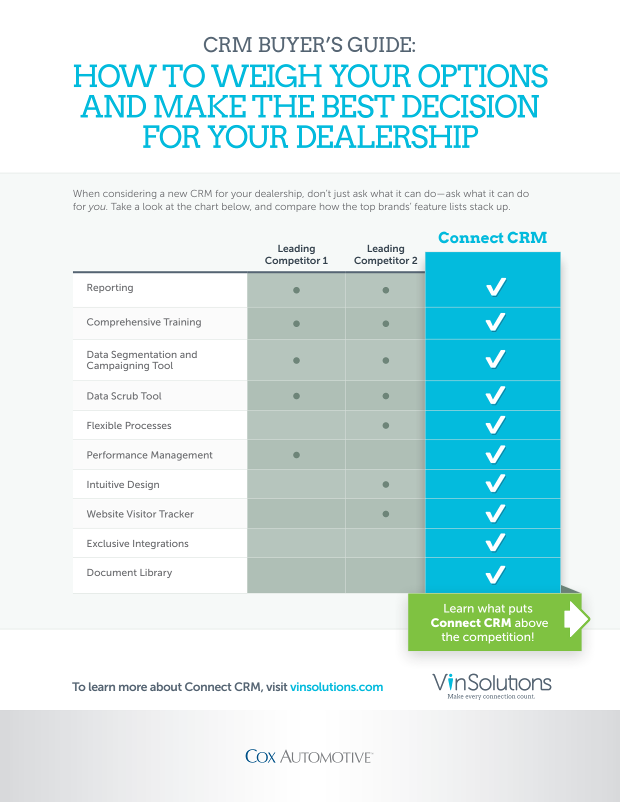
At the center of the guide is a feature-by-feature comparison chart. It sets Connect CRM against two leading competitors across ten capabilities, covering reporting, data tools, training and design. You can see at a glance where the products overlap and where they differ.
The rest of the guide explains why each capability matters on the showroom floor. You'll come away with a sharper sense of what to ask about in areas such as:
- Support and training: what should come standard, and what vendors may try to sell as an add-on
- Process flexibility: setting up lead entry and follow-up around the way your store already works
- Data quality: keeping outdated customer records from generating irrelevant tasks and messages
- Multi-rooftop reporting: monitoring performance across a dealer group from one place
Each section is brief and practical. Instead of marketing theory, you get the specific points that separate one car dealer CRM software package from another.
Website visitor tracking and Cox Automotive integrations
Two topics deserve special attention if your dealership already runs several Cox Automotive tools or relies heavily on online shoppers.
The first is integration. The guide explains how Connect CRM connects with other software from the Cox Automotive family, including Autotrader, vAuto and Dealertrack. The goal is simple: keep the tools, insights and data you rely on working together so your team spends less time switching between systems.
The second is website visitor tracking. You'll read about VinLens, a customer information application that shows what prospects are browsing on your website in real time. That view gives your sales staff a better opening for the next conversation. The guide also covers which CRM VinLens works with, a detail worth knowing before you commit.
Along the way you'll see how a digital document library can cut paper clutter and give salespeople access to customer files from anywhere. You'll also learn how a data segmentation tool helps build timely, personalized campaigns. And you'll find out what VinSolutions' Performance Managers, who bring personal retail automotive experience, do beyond teaching the software.
Get the automotive CRM buyer's guide
The CRM you pick shapes how your team works every day. A careful comparison now can save you from a system that adds clicks, ignores your process or treats support as an upsell.
Download the full guide to get the complete feature comparison chart, plus the explanations behind all ten capabilities and a closer look at the tools and integrations VinSolutions built for dealerships. It's a quick read you can share with your management team before your next vendor meeting.